

No network cables pre-installed during renovation. Wi-Fi signals severely degraded after penetrating walls. Game consoles and TV boxes in the back rooms constantly buffering - these are the real pain points for many owners of older homes. Ripping up walls to rewire is a massive project; swapping in a top-tier mesh router system is too costly.
But that coaxial cable already running through your walls - the one originally meant for cable TV - might just be the "hidden treasure" that solves this problem.
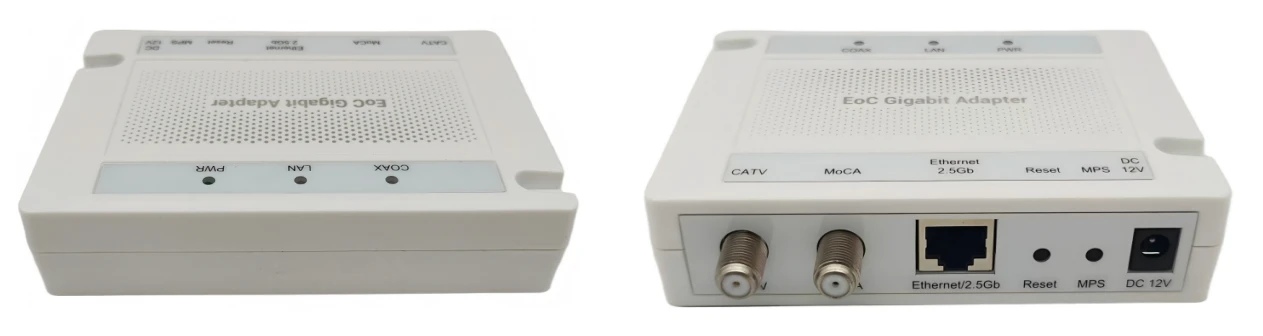
What is MoCA?
MoCA stands for Multimedia over Coax Alliance, an international standards organization founded in 2004. In simple terms, MoCA is a technology that uses the existing coaxial cable in your home to transmit high-speed network signals.
You don't need to rewire anything. Just plug one MoCA adapter into each end, and the coaxial cable turns into an "Ethernet cable." The latest commercial standard is MoCA 2.5, officially released in 2016.
How fast is MoCA 2.5?
MoCA 2.5 delivers a net data rate of up to 2.5 Gbps - 2.5 times faster than the previous generation, MoCA 2.0. For comparison:
Typical Wi-Fi 5 (802.11ac) real-world speeds are around 300–500 Mbps
High-end Wi-Fi 6 mesh systems can still drop to a few hundred Mbps after penetrating walls
MoCA 2.5 latency is under 3 milliseconds - comparable to a wired Ethernet connection
A single MoCA 2.5 network supports up to 16 nodes, more than enough for most households.
Real-world user tests have shown that after switching to MoCA 2.5, wireless speeds jumped from an average of 500 Mbps to 700–1,200 Mbps. As one user put it: "The total cost of a mid-range mesh system plus MoCA adapters might be cheaper than a single high-end mesh setup, but the speed is much better."
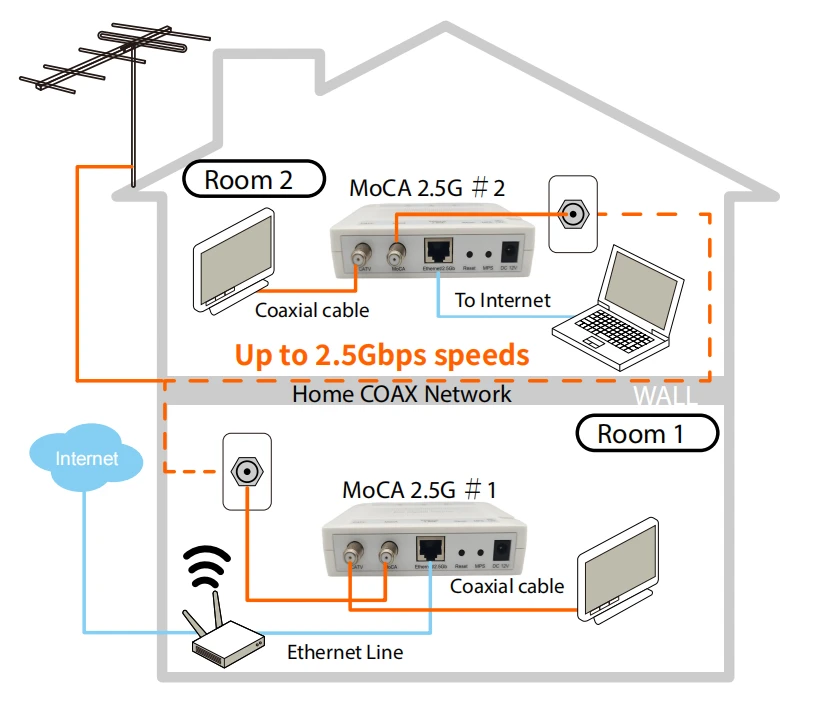
How do you set up a MoCA 2.5 network?
The setup is extremely simple - basically plug-and-play:
Step 1: Make sure you have a coaxial cable outlet in your home (the round cable-TV jack on the wall).
Step 2: Buy at least two MoCA 2.5 adapters. Major brands include ScreenBeam, goCoax, ASUS, Hitron, TRENDnet, and others.
Step 3: At your main router, connect the coaxial cable to the first adapter, then use an Ethernet cable to connect the adapter to your router.
Step 4: In the room where you need network coverage, connect the coaxial cable to the second adapter. From there, you can plug in your computer, game console, or another access point/router to extend Wi-Fi.
⚠️ Note: If your broadband comes in through the same coaxial cable (e.g., with some cable-TV broadband providers), you may need a coaxial splitter to separate the TV signal from the network signal. Also, MoCA 2.5 can have frequency conflicts with DOCSIS 3.1 modems - it's advisable to check with your ISP before purchasing.
Who is MoCA 2.5 best for?
Owners of older homes: No Ethernet in the walls, but coaxial cable is already running to every room
Gamers: Need low-latency, highly stable wired connections
Heavy streamers: 4K/8K video streaming demands high bandwidth
Multi-dwelling units (apartments/hotels): MoCA Access 2.5 can deliver gigabit broadband across an entire building using existing coaxial cable, reducing deployment costs by up to 50%
MoCA 2.5 isn't meant to replace Wi-Fi - it's meant to give Wi-Fi a solid, reliable wired backbone. It lets you turn that idle coaxial cable in your walls into a 2.5 Gbps superhighway - no demolition, no rewiring required.
For anyone suffering from poor Wi-Fi signal but unwilling to undertake major renovations, MoCA 2.5 may be the most cost-effective upgrade. After all, the cable is already there in the wall - you might as well put it to use.


